Remote KAT500


 Locked


 
|
I'd like to hear from anyone who has remoted a KAT500 out to the base of
a vertical. We're moving to an HOA community. The HOA appears to be quite benign and benevolent, I'm planning on a flag pole [with a flag on good wx days] in the backyard, with an insulator at the bottom where I'd like to remote my KAT500 in a wx-proof box. I'll probably power it through the same conduit that carries the coax. It would not be connected to the K3 of course. I'd like to run it in MAN mode as I do now. If I start in AUTO and step through all the band segments, will it learn the settings, and just recall them as soon as it senses RF? 73, Fred K6DGW - Northern California Contest Club - CU in the 50th Running of the Cal QSO Party 3-4 Oct 2015 - www.cqp.org ______________________________________________________________ Elecraft mailing list Home: http://mailman.qth.net/mailman/listinfo/elecraft Help: http://mailman.qth.net/mmfaq.htm Post: mailto:[hidden email] This list hosted by: http://www.qsl.net Please help support this email list: http://www.qsl.net/donate.html Message delivered to [hidden email] |
|
|
On Sat,7/11/2015 2:41 PM, Fred Jensen wrote:
> I'd like to run it in MAN mode as I do now. If I start in AUTO and > step through all the band segments, will it learn the settings, and > just recall them as soon as it senses RF? Yes, as long as it remains in MAN mode. 73, Jim K9YC ______________________________________________________________ Elecraft mailing list Home: http://mailman.qth.net/mailman/listinfo/elecraft Help: http://mailman.qth.net/mmfaq.htm Post: mailto:[hidden email] This list hosted by: http://www.qsl.net Please help support this email list: http://www.qsl.net/donate.html Message delivered to [hidden email] |

|
In reply to this post by k6dgw
CONTENTS DELETED
The author has deleted this message.
|
|
|
Hi,
Well, MFJ is MFJ but Elecraft is Elecraft. I doubt very much that any MFJ tuner will have much success in matching a 15 or 20:1 SWR which a vertical like that will have on some bands. Here is a couple of pictures of my installation which has survived 2 CNY winters without any degradation: http://ab2tc.com/IMG_0181.jpg http://ab2tc.com/IMG_0179.jpg My G5RV is about 15:1 on 10m. I have a resonant 10m dipole up at greater height than the G5RV but the G5RV almost always wins. Of course the G5RV has many deep nulls but outside of those it's always the better antenna so the loss in the tuner, even at that SWR, can not be that bad. The installation is straight forward. There is no AUX cable connection to the K3. I control the tuner using the PC utility through a WiFi serial server. I used an Ethernet serial server for a while, but it was much worse for birdies and I didn't like the need foe another cable to the site. Right now, just power and one coax. BTW the gray box is a switch box for 4 more antennas controlled by the 2nd channel on the serial server. Feel free to contact me on E-mail. My address is good on QRZ.com. I have many previous postings on here about this installation so a search for AB2TC will reveal those. Some older picture links no longer work because my server address has changed. Just replace the server name, whatever it is, with ab2tc.com/ and it should work AB2TC - Knut
|

|
In reply to this post by k6dgw
Has there been progress on this? I have the luck to have a garden shed at
the base of my tower with 12. Volt power....it all works in principle and in practice...just a bit of a pain to run back and forth when there is a fault or other issue. Kind of reminds me of watching green acres as a kid...remember when he had to climb the pole to answer the phone? |
|
|
In reply to this post by k6dgw
Are you using the KAT500 Remote program? Mine are only 15 feet away in a closet, but I never have to touch the units. They are connected using an IP to Serial converter. Works perfect.
Ken K6MR From: Va3ied Sent: Tuesday, December 29, 2015 18:17 To: [hidden email] Subject: Re: [Elecraft] Remote KAT500 Has there been progress on this? I have the luck to have a garden shed at the base of my tower with 12. Volt power....it all works in principle and in practice...just a bit of a pain to run back and forth when there is a fault or other issue. Kind of reminds me of watching green acres as a kid...remember when he had to climb the pole to answer the phone? -- View this message in context: http://elecraft.365791.n2.nabble.com/Remote-KAT500-tp7604849p7612002.html Sent from the Elecraft mailing list archive at Nabble.com. ______________________________________________________________ Elecraft mailing list Home: http://mailman.qth.net/mailman/listinfo/elecraft Help: http://mailman.qth.net/mmfaq.htm Post: mailto:[hidden email] This list hosted by: http://www.qsl.net Please help support this email list: http://www.qsl.net/donate.html Message delivered to [hidden email] ______________________________________________________________ Elecraft mailing list Home: http://mailman.qth.net/mailman/listinfo/elecraft Help: http://mailman.qth.net/mmfaq.htm Post: mailto:[hidden email] This list hosted by: http://www.qsl.net Please help support this email list: http://www.qsl.net/donate.html Message delivered to [hidden email] |
|
|
My tower and garden shed are about 150 feet away. I have LMR400 buried inside some PEX pipe. Would like to use the KAT500 inside the shed...not sure how well a serial connection that distance would work!
scott va3ied |
|
|
In reply to this post by k6dgw
A couple of possibilities:
Use a USB/Serial converter at the tuner end and employ a USB over CAT5 extender device/cable to get there. CAT5 cable is cheap. There are also RS422/RS232 converters out there. RS422 is good for about 4000 feet as I remember and the converters are not very expensive. More expensive but more flexible is a run of duplex fiber optic cable with fiber/Ethernet converters on each end. I use this method and run the fiber in the same conduit as the coaxes between the radios and the tuners/amps. Fiber of course ensures no radiated noise. Plus if you want to control something else at the far end it’s easy to expand. Ken K6MR From: Va3ied Sent: Wednesday, December 30, 2015 06:48 To: [hidden email] Subject: Re: [Elecraft] Remote KAT500 My tower and garden shed are about 150 feet away. I have LMR400 buried inside some PEX pipe. Would like to use the KAT500 inside the shed...not sure how well a serial connection that distance would work! scott va3ied -- View this message in context: http://elecraft.365791.n2.nabble.com/Remote-KAT500-tp7604849p7612014.html Sent from the Elecraft mailing list archive at Nabble.com. ______________________________________________________________ Elecraft mailing list Home: http://mailman.qth.net/mailman/listinfo/elecraft Help: http://mailman.qth.net/mmfaq.htm Post: mailto:[hidden email] This list hosted by: http://www.qsl.net Please help support this email list: http://www.qsl.net/donate.html Message delivered to [hidden email] ______________________________________________________________ Elecraft mailing list Home: http://mailman.qth.net/mailman/listinfo/elecraft Help: http://mailman.qth.net/mmfaq.htm Post: mailto:[hidden email] This list hosted by: http://www.qsl.net Please help support this email list: http://www.qsl.net/donate.html Message delivered to [hidden email] |
|
|
In reply to this post by Va3ied
While the spec for serial is about 8ft, I run it much further in professional sports timing.
Give it a try and see if it works. If you can keep the baud rate down, that will help. To really do it correctly, you will want to run rs232 to rs485 converters and that will certainly solve your problem. Www.rs485.com has the bits you need. You can send serial like this thousands of meters. We do this all the time. It isn't as complicated as it sounds. Mike va3mw > On Dec 30, 2015, at 9:47 AM, Va3ied <[hidden email]> wrote: > > My tower and garden shed are about 150 feet away. I have LMR400 buried inside > some PEX pipe. Would like to use the KAT500 inside the shed...not sure how > well a serial connection that distance would work! > scott va3ied > > > > -- > View this message in context: http://elecraft.365791.n2.nabble.com/Remote-KAT500-tp7604849p7612014.html > Sent from the Elecraft mailing list archive at Nabble.com. > ______________________________________________________________ > Elecraft mailing list > Home: http://mailman.qth.net/mailman/listinfo/elecraft > Help: http://mailman.qth.net/mmfaq.htm > Post: mailto:[hidden email] > > This list hosted by: http://www.qsl.net > Please help support this email list: http://www.qsl.net/donate.html > Message delivered to [hidden email] Elecraft mailing list Home: http://mailman.qth.net/mailman/listinfo/elecraft Help: http://mailman.qth.net/mmfaq.htm Post: mailto:[hidden email] This list hosted by: http://www.qsl.net Please help support this email list: http://www.qsl.net/donate.html Message delivered to [hidden email] |
|
|
In reply to this post by k6dgw
8 ft is not true for rs-232. Depends on type of cable and baud rate. 50ft is generally fine and can go up to hundreds of feet. Maybe you are thinking about usb.
73, Cliff K3LL <div>-------- Original message --------</div><div>From: Mike va3mw <[hidden email]> </div><div>Date:12/30/2015 11:32 AM (GMT-08:00) </div><div>To: Va3ied <[hidden email]> </div><div>Cc: [hidden email] </div><div>Subject: Re: [Elecraft] Remote KAT500 </div><div> </div>While the spec for serial is about 8ft, I run it much further in professional sports timing. Give it a try and see if it works. If you can keep the baud rate down, that will help. To really do it correctly, you will want to run rs232 to rs485 converters and that will certainly solve your problem. Www.rs485.com has the bits you need. You can send serial like this thousands of meters. We do this all the time. It isn't as complicated as it sounds. Mike va3mw > On Dec 30, 2015, at 9:47 AM, Va3ied <[hidden email]> wrote: > > My tower and garden shed are about 150 feet away. I have LMR400 buried inside > some PEX pipe. Would like to use the KAT500 inside the shed...not sure how > well a serial connection that distance would work! > scott va3ied > > > > -- > View this message in context: http://elecraft.365791.n2.nabble.com/Remote-KAT500-tp7604849p7612014.html > Sent from the Elecraft mailing list archive at Nabble.com. > ______________________________________________________________ > Elecraft mailing list > Home: http://mailman.qth.net/mailman/listinfo/elecraft > Help: http://mailman.qth.net/mmfaq.htm > Post: mailto:[hidden email] > > This list hosted by: http://www.qsl.net > Please help support this email list: http://www.qsl.net/donate.html > Message delivered to [hidden email] Elecraft mailing list Home: http://mailman.qth.net/mailman/listinfo/elecraft Help: http://mailman.qth.net/mmfaq.htm Post: mailto:[hidden email] This list hosted by: http://www.qsl.net Please help support this email list: http://www.qsl.net/donate.html Message delivered to [hidden email] ______________________________________________________________ Elecraft mailing list Home: http://mailman.qth.net/mailman/listinfo/elecraft Help: http://mailman.qth.net/mmfaq.htm Post: mailto:[hidden email] This list hosted by: http://www.qsl.net Please help support this email list: http://www.qsl.net/donate.html Message delivered to [hidden email] |
|
|
At one time the RS-232 spec did have a distance rating (probably in the RS232A time frame, it was at least 100 feet as I recall). By the C revision, this was replaced by cable capacitance that the driver could feed. In practice RS-232 can regularly drive several hundred feet of cable, depending on the data rate. The problem in all this is the driver in use. If the driver meets the EI-232 spec, then there should be no problem. However, equipment that takes shortcuts (0-5V swings for example) are probably meant to just connect to something next to it.
Thus the real answer is, “try it.” If communications is flakey you may need to lower the data rate, but most likely you will be able to find a setting that works. Let us know what you find! - Jack, W6FB > On Dec 30, 2015, at 11:57 AM, Cliff Frescura <[hidden email]> wrote: > > 8 ft is not true for rs-232. Depends on type of cable and baud rate. 50ft is generally fine and can go up to hundreds of feet. Maybe you are thinking about usb. > > 73, > > Cliff K3LL > > <div>-------- Original message --------</div><div>From: Mike va3mw <[hidden email]> </div><div>Date:12/30/2015 11:32 AM (GMT-08:00) </div><div>To: Va3ied <[hidden email]> </div><div>Cc: [hidden email] </div><div>Subject: Re: [Elecraft] Remote KAT500 </div><div> > </div>While the spec for serial is about 8ft, I run it much further in professional sports timing. > > Give it a try and see if it works. If you can keep the baud rate down, that will help. > > To really do it correctly, you will want to run rs232 to rs485 converters and that will certainly solve your problem. Www.rs485.com has the bits you need. You can send serial like this thousands of meters. We do this all the time. > > It isn't as complicated as it sounds. > > Mike va3mw > > > >> On Dec 30, 2015, at 9:47 AM, Va3ied <[hidden email]> wrote: >> >> My tower and garden shed are about 150 feet away. I have LMR400 buried inside >> some PEX pipe. Would like to use the KAT500 inside the shed...not sure how >> well a serial connection that distance would work! >> scott va3ied >> >> >> >> -- >> View this message in context: http://elecraft.365791.n2.nabble.com/Remote-KAT500-tp7604849p7612014.html >> Sent from the Elecraft mailing list archive at Nabble.com. >> ______________________________________________________________ >> Elecraft mailing list >> Home: http://mailman.qth.net/mailman/listinfo/elecraft >> Help: http://mailman.qth.net/mmfaq.htm >> Post: mailto:[hidden email] >> >> This list hosted by: http://www.qsl.net >> Please help support this email list: http://www.qsl.net/donate.html >> Message delivered to [hidden email] > ______________________________________________________________ > Elecraft mailing list > Home: http://mailman.qth.net/mailman/listinfo/elecraft > Help: http://mailman.qth.net/mmfaq.htm > Post: mailto:[hidden email] > > This list hosted by: http://www.qsl.net > Please help support this email list: http://www.qsl.net/donate.html > Message delivered to [hidden email] > ______________________________________________________________ > Elecraft mailing list > Home: http://mailman.qth.net/mailman/listinfo/elecraft > Help: http://mailman.qth.net/mmfaq.htm > Post: mailto:[hidden email] > > This list hosted by: http://www.qsl.net > Please help support this email list: http://www.qsl.net/donate.html > Message delivered to [hidden email] ______________________________________________________________ Elecraft mailing list Home: http://mailman.qth.net/mailman/listinfo/elecraft Help: http://mailman.qth.net/mmfaq.htm Post: mailto:[hidden email] This list hosted by: http://www.qsl.net Please help support this email list: http://www.qsl.net/donate.html Message delivered to [hidden email] |
|
|
In reply to this post by Cliff Frescura
BUT it should be done with a fully compliant serial device, using the
full RS-232 voltages (+/- 12V, some laptops 'cheat' using lower or not negative voltages) in order to extend that far. Beyond 100' I would expect that the bit rate would have to come down too, but I haven't tested that. I would also suggest a full 9 wire PLUS shield cable, bonding the shield at both ends to the device/computer chassis via the connector housing. You may need some ferrite too, to be determined. HNY, Rick NHC On 12/30/2015 11:57 AM, Cliff Frescura wrote: > 8 ft is not true for rs-232. Depends on type of cable and baud rate. 50ft is generally fine and can go up to hundreds of feet. Maybe you are thinking about usb. > > 73, > > Cliff K3LL > > -------- Original message --------From: Mike va3mw <[hidden email]> Date:12/30/2015 11:32 AM (GMT-08:00) To: Va3ied <[hidden email]> Cc: [hidden email] Subject: Re: [Elecraft] > > Remote KAT500 While the spec for serial is about 8ft, I run it much further in professional sports timing. > > Give it a try and see if it works. If you can keep the baud rate down, that will help. > > To really do it correctly, you will want to run rs232 to rs485 converters and that will certainly solve your problem. Www.rs485.com has the bits you need. You can send serial like this thousands of meters. We do this all the time. > > It isn't as complicated as it sounds. > > Mike va3mw > > > >> On Dec 30, 2015, at 9:47 AM, Va3ied <[hidden email]> wrote: >> >> My tower and garden shed are about 150 feet away. I have LMR400 buried inside >> some PEX pipe. Would like to use the KAT500 inside the shed...not sure how >> well a serial connection that distance would work! >> scott va3ied >> >> >> >> -- >> View this message in context: http://elecraft.365791.n2.nabble.com/Remote-KAT500-tp7604849p7612014.html >> Sent from the Elecraft mailing list archive at Nabble.com. >> ______________________________________________________________ >> Elecraft mailing list >> Home: http://mailman.qth.net/mailman/listinfo/elecraft >> Help: http://mailman.qth.net/mmfaq.htm >> Post: mailto:[hidden email] >> >> This list hosted by: http://www.qsl.net >> Please help support this email list: http://www.qsl.net/donate.html >> Message delivered to [hidden email] > ______________________________________________________________ > Elecraft mailing list > Home: http://mailman.qth.net/mailman/listinfo/elecraft > Help: http://mailman.qth.net/mmfaq.htm > Post: mailto:[hidden email] > > This list hosted by: http://www.qsl.net > Please help support this email list: http://www.qsl.net/donate.html > Message delivered to [hidden email] > ______________________________________________________________ > Elecraft mailing list > Home: http://mailman.qth.net/mailman/listinfo/elecraft > Help: http://mailman.qth.net/mmfaq.htm > Post: mailto:[hidden email] > > This list hosted by: http://www.qsl.net > Please help support this email list: http://www.qsl.net/donate.html > Message delivered to [hidden email] ______________________________________________________________ Elecraft mailing list Home: http://mailman.qth.net/mailman/listinfo/elecraft Help: http://mailman.qth.net/mmfaq.htm Post: mailto:[hidden email] This list hosted by: http://www.qsl.net Please help support this email list: http://www.qsl.net/donate.html Message delivered to [hidden email] |
|
|
In reply to this post by Va3ied
Scott,
*Real* RS-232 ports (those which comply with the +/- 25 volt at the driver) would easily drive that 150 foot distance, but the PC based drivers and receivers are not likely to work reliably because the voltage swing is insufficient to guarantee at least +/- 3 volts of swing at the receiver. The other limiting factor is the capacitance between conductors in the cable - that distorts the waveform. It might work if you invest in good quality cable and work with slower baud rates. I would think the loss through 150 feet of LMR400 would be low enough to be practical and allow the KPA500 to live in the shack. 73, Don W3FPR On 12/30/2015 9:47 AM, Va3ied wrote: > My tower and garden shed are about 150 feet away. I have LMR400 buried inside > some PEX pipe. Would like to use the KAT500 inside the shed...not sure how > well a serial connection that distance would work! > scott va3ied > > ______________________________________________________________ Elecraft mailing list Home: http://mailman.qth.net/mailman/listinfo/elecraft Help: http://mailman.qth.net/mmfaq.htm Post: mailto:[hidden email] This list hosted by: http://www.qsl.net Please help support this email list: http://www.qsl.net/donate.html Message delivered to [hidden email] |
|
|
In reply to this post by k6mrmagnet
I have no idea whether this is a possibility or not. I've just come across it
in another forum and haven't studied it in detail. http://www.hamcom.dk/VNWA/How%20to%20Operate%20VNWA2%20and%20VNWA3%20Remotely%20Wired%20or%20Wireless.pdf On 12/30/2015 10:10 AM, Ken K6MR wrote: > A couple of possibilities: > > Use a USB/Serial converter at the tuner end and employ a USB over CAT5 extender device/cable to get there. CAT5 cable is cheap. There are also RS422/RS232 converters out there. RS422 is good for about 4000 feet as I remember and the converters are not very expensive. > > More expensive but more flexible is a run of duplex fiber optic cable with fiber/Ethernet converters on each end. I use this method and run the fiber in the same conduit as the coaxes between the radios and the tuners/amps. Fiber of course ensures no radiated noise. Plus if you want to control something else at the far end it’s easy to expand. > > Ken K6MR > > > From: Va3ied > Sent: Wednesday, December 30, 2015 06:48 > To: [hidden email] > Subject: Re: [Elecraft] Remote KAT500 > > My tower and garden shed are about 150 feet away. I have LMR400 buried inside > some PEX pipe. Would like to use the KAT500 inside the shed...not sure how > well a serial connection that distance would work! > scott va3ied > > > > -- > View this message in context: http://elecraft.365791.n2.nabble.com/Remote-KAT500-tp7604849p7612014.html > Sent from the Elecraft mailing list archive at Nabble.com. > ______________________________________________________________ > Elecraft mailing list > Home: http://mailman.qth.net/mailman/listinfo/elecraft > Help: http://mailman.qth.net/mmfaq.htm > Post: mailto:[hidden email] > > This list hosted by: http://www.qsl.net > Please help support this email list: http://www.qsl.net/donate.html > Message delivered to [hidden email] > > ______________________________________________________________ > Elecraft mailing list > Home: http://mailman.qth.net/mailman/listinfo/elecraft > Help: http://mailman.qth.net/mmfaq.htm > Post: mailto:[hidden email] > > This list hosted by: http://www.qsl.net > Please help support this email list: http://www.qsl.net/donate.html > Message delivered to [hidden email] ______________________________________________________________ Elecraft mailing list Home: http://mailman.qth.net/mailman/listinfo/elecraft Help: http://mailman.qth.net/mmfaq.htm Post: mailto:[hidden email] This list hosted by: http://www.qsl.net Please help support this email list: http://www.qsl.net/donate.html Message delivered to [hidden email] |
|
|
In reply to this post by Rick WA6NHC-2
On Wed,12/30/2015 12:20 PM, Rick WA6NHC wrote:
> BUT it should be done with a fully compliant serial device, using the > full RS-232 voltages (+/- 12V, some laptops 'cheat' using lower or not > negative voltages) in order to extend that far. Beyond 100' I would > expect that the bit rate would have to come down too, but I haven't > tested that. I would also suggest a full 9 wire PLUS shield cable, > bonding the shield at both ends to the device/computer chassis via the > connector housing. You may need some ferrite too, to be determined. I suggest a different solution for the wiring. Use a decent grade of CAT5/6 cable, using one pair per circuit. CAT5/6 is four twisted pairs, which inherently reject noise, and it has low capacitance between conductors. To avoid Pin One Problems, tie all four "striped" conductors together and wire them both to the signal ground pin and to the connector shell on both ends. If you do use shielded CAT5/6, wire the shields to the connector shells and the four striped conductors to the ground pin. Years ago, we used RS232 to control sophisticated audio signal processing systems in theaters, stadiums, and churches. The RS232 cable was often 200 ft or longer, running to a laptop. These links worked fine. I don't recall what baud rates we used. As to bandwidth -- RS232 is an un-matched protocol, with a low-Z source and high Z receiver, so bandwidth/baud rate is limited by cable capacitance. That's why the spec was revised many years ago to reflect the availability of low capacitance cables. 73, Jim K9YC ______________________________________________________________ Elecraft mailing list Home: http://mailman.qth.net/mailman/listinfo/elecraft Help: http://mailman.qth.net/mmfaq.htm Post: mailto:[hidden email] This list hosted by: http://www.qsl.net Please help support this email list: http://www.qsl.net/donate.html Message delivered to [hidden email] |
|
|
I rec'd this from elecraft today... Hi Scott, We have attached, below, the procedure to train and optimize the KAT with the KPA500. After the training is completed, please leave the KAT in the MAN position. It should operate better for you in that position. We would suggest you have the latest firmware loaded into the KAT. You can place each antenna on its own port and train the KAT for those bands. Once trained, the KAT will find the closest full cycle tune for the frequency you have landed on. If it can not find a successful tune, you will need to tune the KAT while in the MAN position to get the VSWR down at that frequency. As a side note, the use of the KAT Utility can provide the actual Bypass VSWR (under the Operate tab). This is what the KAT is actually seeing throught the transmission line. The Bypass VSWR should not be above 10 to 1, or the KAT will not be able to complete a full cycle tune. We hope this helps. 73, -- -------------------------- Craig Smith W6WL Elecraft Customer Support <a href="tel:831-763-4211%20x%20174" target="_blank" value="+18317634211">831-763-4211 x 174 -------------------------- ****************** Here is a procedure to setup your KAT500 with a KPA500 *********************************** Please enter the KAT500 Utility and select the Configuration tab then click on the button to Optimize for KPA500. 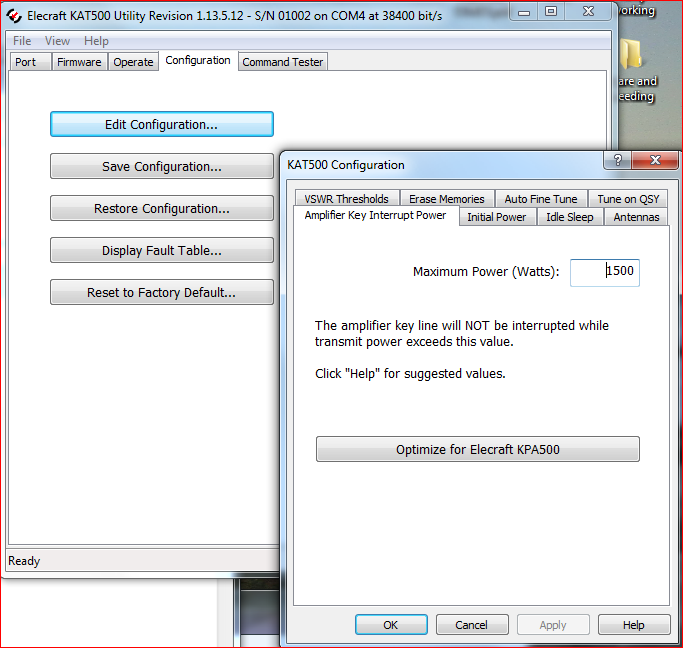 Training the Tuner Overview We will be stepping through each band where you have an antenna connected to the KAT500, selecting the top, bottom and places in the middle of each band where you expect to operate. At each of these points, we will be causing the transceiver to emit a steady-state, CW RF signal for the KAT500 to use while it executes a full tune cycle. Since the KAT500 is an Automatic Tuner, it will remember the settings it finds at each of the points in the band. This is referred to as 'Training the Tuner'. The following sequence assumes that the transceiver, KAT500 and, if appropriate, the KPA500 are installed as specified in the KAT500 Owner's Manual, Figure 4. Set up - On the transceiver set it up to generate 25 watts. We recommend that you set up a way to generate 25 watts of RF with a constant carrier wave (CW) that can be keyed at will. This CW signal at 25 watts will need to be present until the KAT500 has completed a full tune cycle. - On the KAT500, select the MAN mode. - On the KAT500, Tap the ANT button to select the appropriate antenna for the selected band. The ANT LED will light solidly indicating the antenna port selected. - On the transceiver, select the the appropriate band. Then, adjust VFO to the lowest spot in that band where your antenna will work. For each VFO Setting perform the following to Train the KAT500: 1) Then, Tap the MODE button so that AUTO is enabled. The AUTO LED will stay on solidly. This places the tuner into Automatic mode so that it will remember the settings found during the upcoming tune cycle. - On the transceiver, adjust VFO frequency for the upper end of the band where your antenna will operate. Repeat Steps 1-3 above for this setting. - Then, move into the middle of the band and repeat Steps 1-3 again. Train the tuner on all Bands - Next, step to other bands where your antenna can operate within a 10:1 SWR ratio. Perform the same steps above as with the first band chosen. - How do you know how many times per band needed to fully train the tuner? Here's the answer from the KAT500 Owner's Manual. 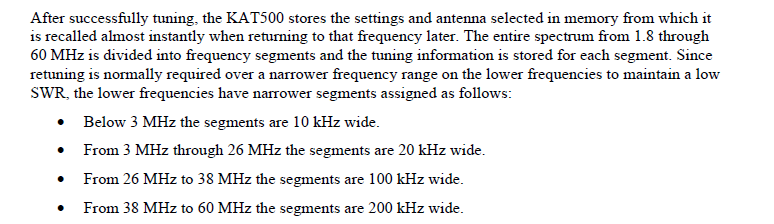 Training the tuner with all of your antennas If you have more than one antenna, continue to ANT 2 and ANT 3 ports using the same technique above for those antennas. The KAT500 tuner can remember settings for all 3 antenna ports separately! Make it easy for your Tuner to remember what it was trained to do Once you have fully trained your KAT500 tuner on all bands and all Antennas, you can save your work using the KAT500 Utility. Go to the Configuration tab in the Utility and select Save Configuration to complete your tuner's training. On Wed, Dec 30, 2015 at 7:38 PM, Jim Brown-10 [via Elecraft] <[hidden email]> wrote: On Wed,12/30/2015 12:20 PM, Rick WA6NHC wrote: |
|
|
In reply to this post by Cliff Frescura
USB 2.0 spec is 5 meters, about 17 feet, between devices.
USB 3.0/3.1 doesn't give a max distance spec but the generally accepted distance is 3 meters between devices. If it was me I'd use CAT5/6 cable, CAT6 being preferred because of the bigger conductors and more twists per inch. Less than $50 bucks for a couple hundred feet of bulk CAT6 and a couple of DE9 connectors. On 12/30/2015 1:57 PM, Cliff Frescura wrote: > 8 ft is not true for rs-232. Depends on type of cable and baud rate. 50ft is generally fine and can go up to hundreds of feet. Maybe you are thinking about usb. > > 73, > > Cliff K3LL > > essage delivered to [hidden email] -- R. Kevin Stover AC0H ARRL FISTS #11993 SKCC #215 NAQCC #3441 --- This email has been checked for viruses by Avast antivirus software. https://www.avast.com/antivirus ______________________________________________________________ Elecraft mailing list Home: http://mailman.qth.net/mailman/listinfo/elecraft Help: http://mailman.qth.net/mmfaq.htm Post: mailto:[hidden email] This list hosted by: http://www.qsl.net Please help support this email list: http://www.qsl.net/donate.html Message delivered to [hidden email] |
«
Return to Elecraft
|
1 view|%1 views
| Free forum by Nabble | Edit this page |